
Weather Station
5 Dec 2025 · Temp · Wind · Rain
My overengineered thermometer
I'm interssted in weather. I guess as a Brit having an interest in the weather is part of my DNA. I've had an Accurite weather station for a while, it has an inside screen with a few sensors and an outside thermometer. I was constantly frustrated that I could sniff the packets from the outdoor sensor, but wasn't ever able to do anything with the data from the screen in the kitchen. Also the outside sensor chewed through batteries.
One of my friends is also interested in weather (again, not a huge surprise he's the same age as me and has other similar interests) well the other day he told me about a new weather station he had bought. An Ecowitt 7-in-1 device, the bit that really tickled my fancy was the gateway that it came with. It has an API. I recently celebrated a milestone anniversary at work, they gave me some Amazon vouchers to celebrate. You can see where this is going.

Compared with some of the houses in the UK, I live in a new house. It's 17 years old, but bigger picture, it's new. Therefore it's far too close to my neighbours houses. Wall to wall it's about 3m between me and my neighbours one way and 1.5m between me and next door's garage the other (this is weather station related, honest, I'm not just moaning about modern building practices). This means it's next to impossible to get a ladder up to get up to the roof. When I mounted my white stick antenna, I had to get an aerial man to use ropes and climbing harnesses to mount it. So getting it on the roof is a job for future. For the time being the outdoor unit is on an L pole on my shed.

WS90 Outdoor Unit
The outdoor unit is a multi tiered cylinder, it's about 210x95mm and is made from hard plastic. The upper section is a haptic rain sensor, ultrasonic wind speed sensor, solar pannel & sunlight sensor. The middle section is the battery box & brains of the operation. The lower section is the temperature, pressure & humidity sensor.

The unit is well put together, well sealed and nicely finished. It fits on a standard 1" aerial pole.
HP2564 Indoor Display
The internal display is a 180mm (7") colour screen with a swing up temperature & pressure sensor and 8 touch sensitive buttons along the bottom edge.
GW3000 Gateway
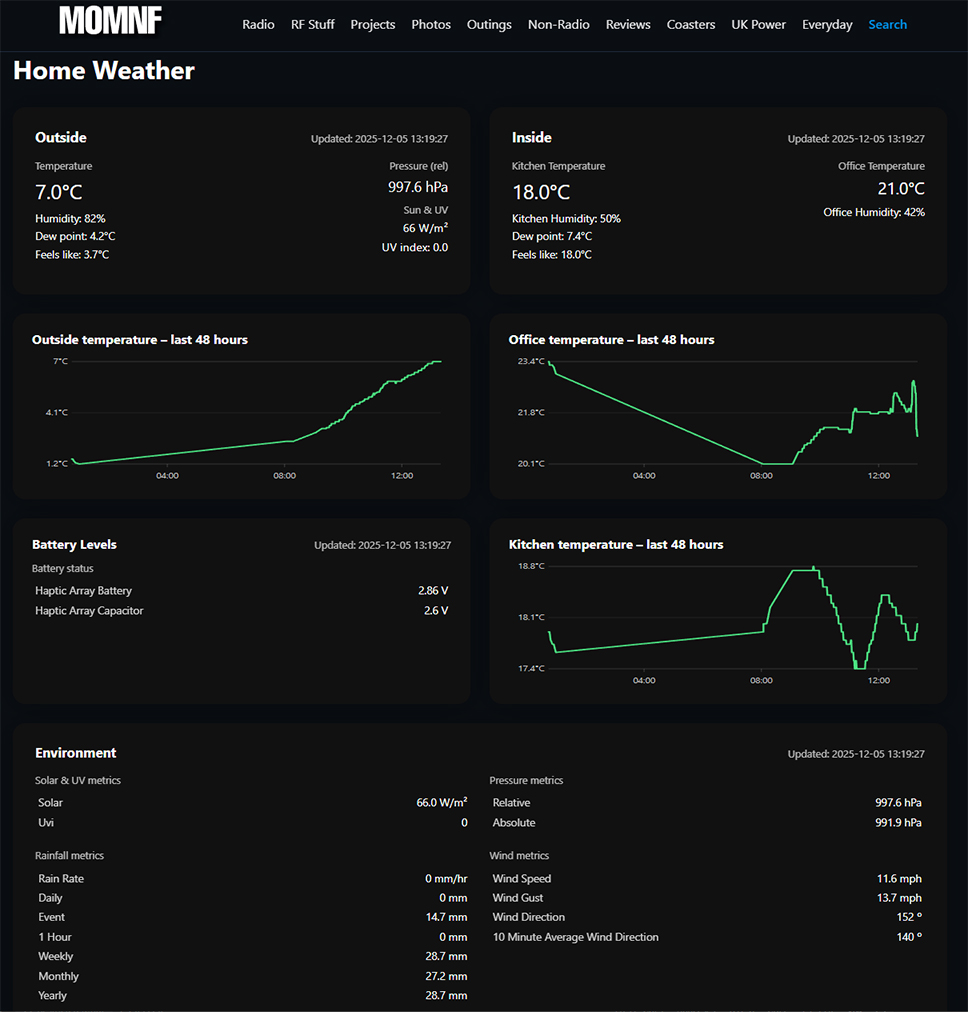
The gateway allows you to connect a bunch of other sensors and it has its own API that I intend to use to push data to the homepage on our smart TVs. Right now I'm using it to push the temperature of my office up to this website. I've ordered a couple of other indoor temperature sensors to keep track of the temperatures round the house.The setup is a bit of a faff, rather than the gateway catching everything and sending it all up to the cloud as tagged output, it creates itself as a new device with different sensors, so you end up with 2 markers on the temperature map and a faff getting API access to the different readings (more on that shortly)

Getting the data to m0mnf.com
This should have been a nice simple job, ask the API for the data from display (it speaks to the outdoor sensor) and grab the office temp from the gateway. I want to display both the outdoor data, the kitchen window ledge temp and the office temp on a website dashboard. I want the data from the gateway in my LAN so I can display it on the TVs as well as the family calendar and a few other bits.The API doesn't let you differentiate between devices when you poll it for data. So you have to make two API calls, 1 with the MAC address of the screen for kitchen & outside data and 1 with the MAC address of the gateway for the temperature in my office. Then manipulate the returned JSON to show both temperatures. This is way more faffy than it should be. Maybe I have a weird use case? I don't understand the logic of 1 set of indoor temperature data overwriting the other? Anyway, after some faffing I got it to work the way I wanted it to.
The link is here if you want to look at the temperatures in and around casa tiggy.